



TydeCo™ supports Sage Premier for clients needing desktop-based payroll with reliable SARS compliance, standard reporting, and offline access.

A robust on-premise system still used by thousands, ideal for clients in low-connectivity environments.
Open database access enables custom reporting and Excel integrations for deeper payroll and HR insights
TydeCo™ continues to support Premier users with fully trained consultants and compliance-aligned implementation services
Intrinsically built for performance and precision, these Sage Premier features support your every HR and payroll need, from compliance to reporting, all within one comprehensive system.
Employees can apply for leave, update personal details, submit claims, and access payslips or IRP5s anytime, from any device.
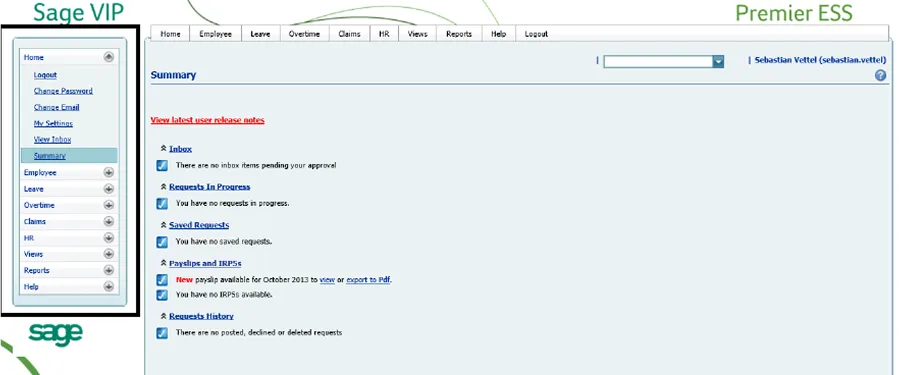
Leave is managed within BCEA and internal policies. The module integrates directly with payroll, eliminating the need for double entry.

Helps track planned and completed training, monitor direct and indirect costs, and maintain compliance with skills development regulations.

Gives HR instant access to EE data, including training, disciplinary records, qualifications, career and pay history, and interview tracking.

Connects to payroll data and provides flexible, real-time reports to support faster, more confident payroll and HR decisions.

Beyond its HR and payroll core, these advanced Sage Premier modules offer businesses even greater value for recruitment, communication, as well as financial management.

Track and manage staff loans with built-in calculators, repayment limits, and monthly statements linked to payroll.

Allocate payroll costs to multiple projects, departments, or sites—even if employees split hours across cost centers in one pay period.

Generate secure, interactive payslips that reflect full compensation details and are accessible to employees on mobile or desktop devices.
Many teams start with desktop payroll. This story shows what’s possible when you’re ready to take the next step.
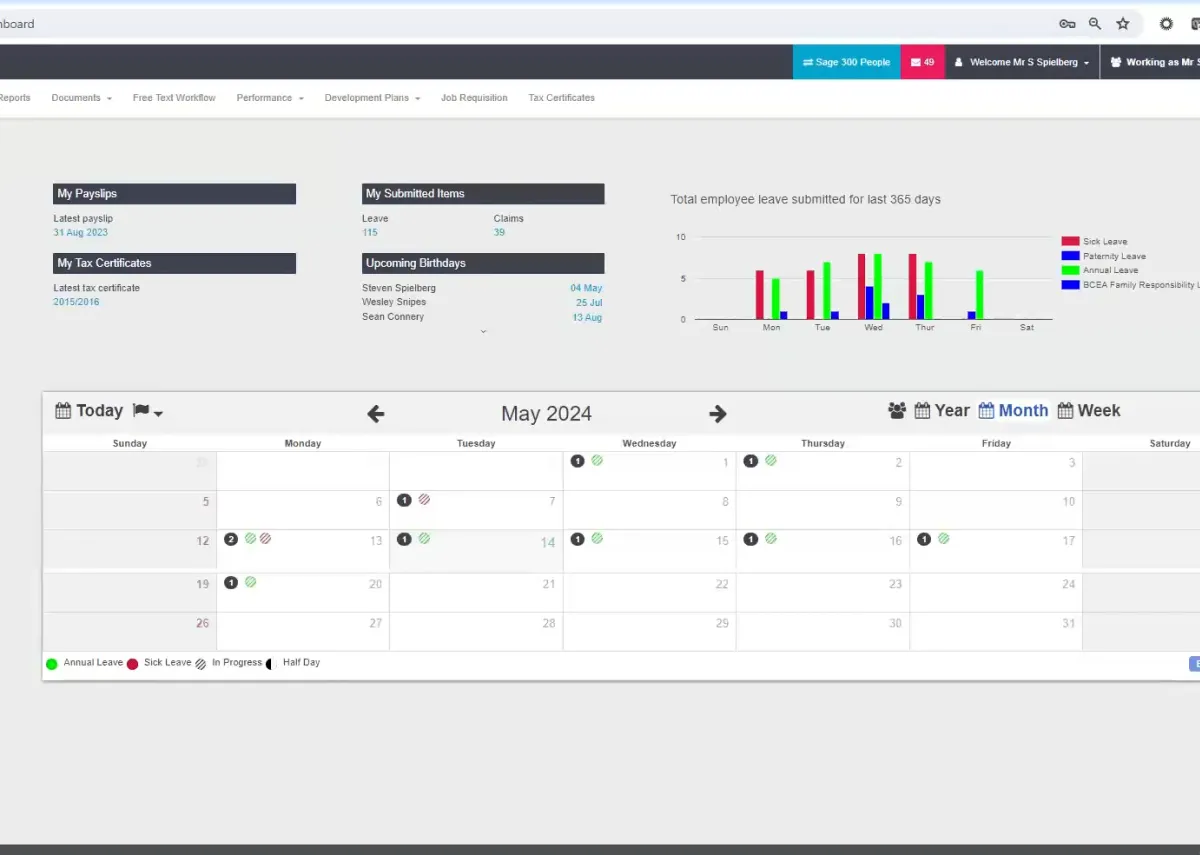
The desktop product we were using before Sage 300 People served us well for many years, but we realised that we could improve efficiencies and streamline our business by implementing a newer solution. Sage 300 People gives us a real-time view of our payroll, so we always have our finger on the pulse.


Sage Premier supports high-volume HR and payroll environments, offering the stability and governance required by regulated organizations.
Premier remains widely used. But if you’re exploring future options, this Sage 300 People demo shows what’s possible next.
We’re proud to support the teams behind these logos. Long-term partnerships built on trust, capability, and results that hold up.







Sage Premier supports South African businesses needing local HR tools that match regional compliance and internal payroll processes. TydeCo™ helps implement and maintain it.
We want the world to see how virtually anything is possible with the right tools, solutions, support, and, of course, expertise.
Explore our latest thinking on financial systems, reporting strategy, and digital transformation, tailored to the industries and tools we support.
Just getting started or fine-tuning your setup? Here are a few questions that often come up along the way.
Sage Premier is still commonly used by clients who work in remote areas with spotty internet access. The reason is simple, Sage Premier is still one of the best, most stable desktop payroll systems that complies with all industry and SARS regulations.
Sage Premier has three key strengths that keep it in the game. 1) It has robust compliance features. 2) It has robust backend reporting via ODBC (Open Database Connectivity). 3) It supports Excel-based customization and extraction.
Absolutely, yes. We support Sage Premier implementations and still provide training and maintenance for legacy users. We ensure that our clients and their teams remain compliant even when they still rely on older systems.
Sage Premier isn’t as snazzy as many newer payroll platforms. For instance, it doesn’t have the same mobile features and integrations as most cloud-native tools. However, it’s still one of the most dependable systems for desktop-focused organizations.
We provide unequivocal support to all our clients. For our legacy clients, this means continued support while we plan future upgrades together. When the time is right, we provide training and technical assistance during the transition to newer systems.
Sage Premier (VIP Premier) is different to other Sage products because it’s designed specifically as an in-house desktop solution for HR and payroll, although it provides some of the same features as the cloud-based versions. This makes it perfect for teams that work in locations with limited or unstable internet connections.
You might also want to consider Sage Premier if:
We also enable Open Data Connectivity (ODBC) access, which pulls raw data straight from the system into Excel or BI tools for comprehensive reporting. In addition to working with multiple platforms, it’s also compatible with legacy systems, making it a stepping stone to modern, streamlined processes.
Ultimately, Sage Premier is a good choice for organizations that need reliability, SARS compliance (South Africa), and stability rather than bells and whistles.
Sage Premier supports many HR and payroll functions. One of the great things about this set up is that all tools (and data) are available on one central system. Let’s take a closer look:
Other core modules that enhance HR processes include employment equity reporting from the system, and aligning leave rules to policy and law.
As you can see, desktop systems still provide plenty of value to companies that need reliable payroll solutions, but operate in areas with spotty internet connections.
ODBC is one of Premier’s standout features, principally due to the direct database connection that enables clients to link payroll data into external reporting or BI tools. The upshot? Combining payroll and HR information with finance and operational data for a holistic view of your payroll/HR status.
You can also set up scheduled extracts, which are automatically repeated in monthly or quarterly reporting packs. No manual input required.
Managers enjoy pivot-ready fields, which enable them to build Excel pivot tables that conveniently summarize costs, headcounts, and leave data by department.
ODBC is particularly useful when it comes to audit readiness. Not only does it ensure compliance, but it also standardizes reports and creates consistent layouts. This is perfect for auditors who can quickly access source data, and for payroll teams that have all the data they need to avoid scrambling for information at auditors’ requests.
We don’t want your business to fall foul of any rules, regulations, and legislation. That’s why compliance is a priority. We understand local compliance requirements, and know they can appear daunting or overwhelming. Our job is to simplify compliance processes, so you needn’t worry about violations and penalties.
Here’s how:
All changes are logged to provide clear audit trails, helping you maintain control over your system and demonstrating your control to auditors.
It also helps that we use standardized templates that reduce the need for manual data entry and edits.
Sage Premier regularly pushes through updates to SARS submissions, PAYE, UIF, and other South African statutory requirements. Internal control logs changes, creating an audit trail for managers to immediately see who’s responsible for which updates.
Premier’s benefits are largely limited to single-entity environments, not multi-country growth and complex cross-entity consolidations. Outgrowing manual processes is a clear sign you need to upgrade to Sage 300 People, which provides the deeper automation features needed to configure workflows for HR processes, approvals, and escalations.
Sage 300 People’s APIs and modern architecture are useful for businesses that have developed to the point where they need tighter integration with finance systems and learning management platforms.
Then there are the increased ESS (employee self-service) benefits, including mobile self-service at scale. For example, using mobile devices to reach a large, dispersed workforce.
Last but not least, Premier delivers a platform with a future-facing roadmap, so you can comfortably plan for future expansion.
It’s important to note that Sage hasn’t cast Premier aside. It still provides ongoing support for companies with simple accounting needs. However, its focus is on 300 People, the most logical choice for organizations whose goals include long-term growth.